
Tributary: Fundraising for Groups That Can’t Legally Receive Donations
Role
Product Designer
Independent Proposal
Duration
Aug – Nov 2026
Scope
Research, service design, UX/UI, prototyping
In Short
Local volunteer groups in Czech nonprofits can’t legally receive gifts, so the people who know them rarely give. Tributary is a concept that lets donors give to a specific group while the regional branch receives the money, issues receipts and approves spending. Key decisions: the branch receives every gift, the platform never holds money, and companies are checked before they pay. Status: a concept with clickable prototypes; tax and UX reviews are in progress.
Most donors I surveyed have a personal link to a local volunteer group. None of them gave to it in the past year, and the most common reason was that nobody asked.
Some large Czech nonprofits work on three levels: headquarters, regional branches and local volunteer groups. The local group is the one people know personally. Yet it has no legal identity, so it can’t accept a single crown. Every gift has to be received by the regional branch above it, which issues tax receipts, approves spending and answers for the money.
Czech fundraising tools already handle donor records and receipts, but none of the five I reviewed says it supports groups that can’t legally receive money. Tributary is a concept for that missing layer. I designed how one gift travels through three roles: a donor in a website widget, a group leader on a phone, and a branch treasurer in an admin panel. The challenge wasn’t the screens. It was keeping giving effortless while respecting who may receive money, who approves it and what happens when a goal isn’t reached.
The interface is in Czech, because the product is built around Czech law. A short caption next to each screen explains what it shows.
01/ The Problem
One organisation, three levels
Imagine a donor who wants to help the local first-aid group buy new stretchers. It sounds like a simple transfer. In practice, one gift touches three parties with different rights and duties:
- The local group runs the activities and tells the story, but has no company ID and no bank account of its own.
- The regional branch is the legal entity. It receives the money, keeps the books and issues donation receipts for tax returns.
- Headquarters sets the rules for the whole organisation and runs national appeals, such as flood relief.
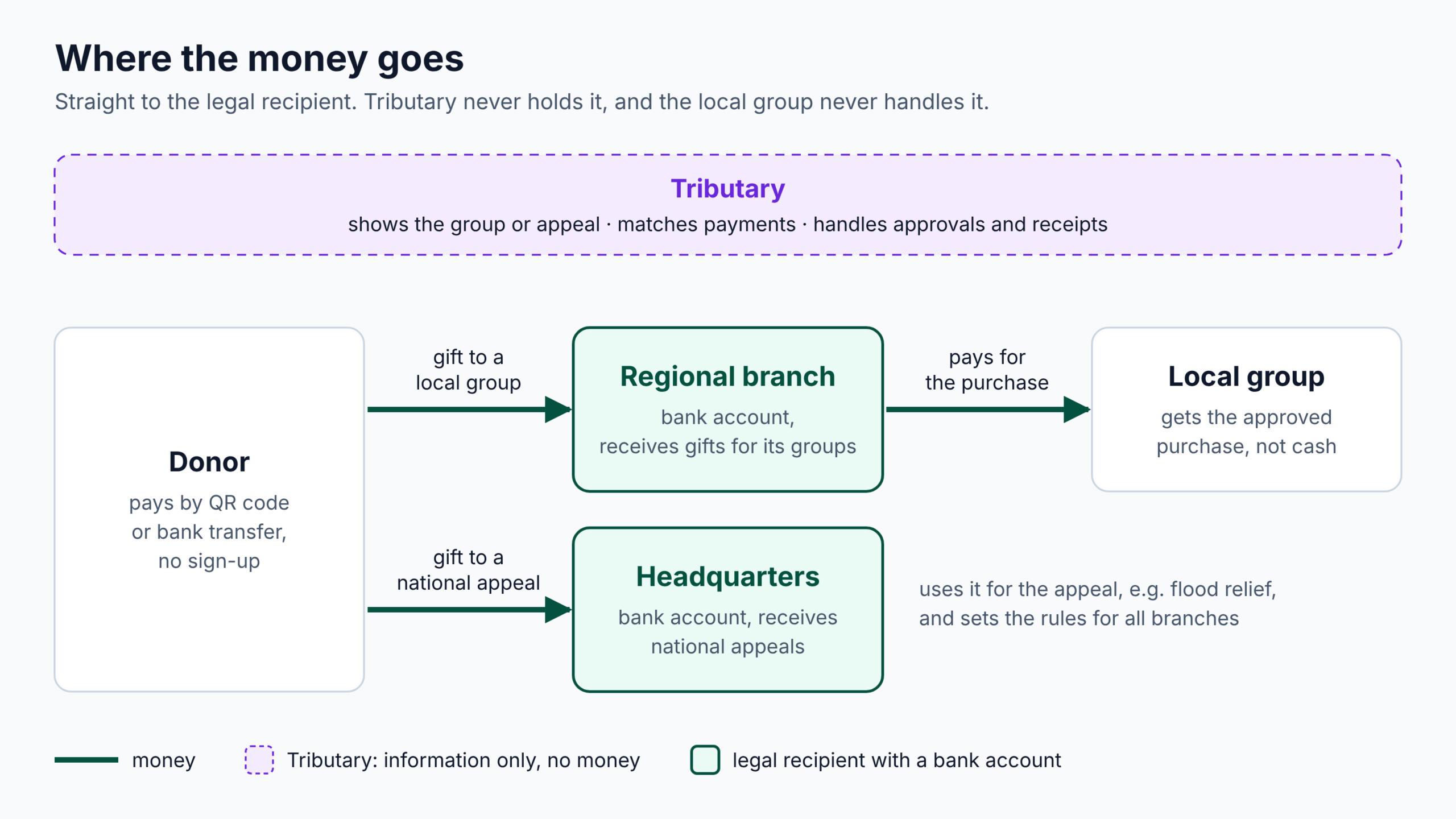
Image: where the money goes
Caption: The donor pays by QR code or bank transfer. A gift to a local group goes straight to the regional branch’s bank account, and the branch then pays for, or reimburses, the group’s approved purchases. A gift to a national appeal goes straight to headquarters, which also sets the rules for the branches. Tributary sits above the money flow: it shows the group and its goal, matches payments and handles approvals, but never holds the money.
Who may receive a donation
Because only the branch can receive money, every simple question gets a second layer:
- Receipts: the donor gives to the group, but the branch has to issue the receipt.
- Spending: the group wants to buy something, but the branch has to approve and pay for it.
- Goals: if the stretchers are never fully funded, the money still has to go somewhere the donor agreed to.
- Companies: a business gift may clash with the organisation’s ethics rules, and someone has to decide before any money moves.
None of this is visible to the donor, and none of it should be. The design problem was to hide the complexity from the donor without hiding it from the people who answer for the money.
What existing tools already cover
What can Czech nonprofits already use? I compared five tools on their public websites: two donation platforms (Darujme.cz, Donio) and three fundraising and admin tools (FundraisingPack, Péče o dárce, Aprone).
| Need | Donation platforms | Fundraising and admin tools | Tributary |
|---|---|---|---|
| Collect gifts online | Yes, through the platform, for a fee | Through forms, payment gateways or Darujme | Yes, straight to the branch’s bank account |
| Donation receipts | Darujme doesn’t issue them | Yes, one by one or in bulk | Yes |
| Match bank payments | Not needed, the platform pays out | Yes, from bank statements | Yes, from bank statements |
| A local group without legal identity as the recipient | No, Darujme requires a legal entity | Not mentioned | Yes |
| Group leaders as users | Not mentioned | Not mentioned | Yes |
| Company sector checked against the organisation’s rules before payment | Not mentioned | Not mentioned | Yes |
“Not mentioned” means the website doesn’t say so, not that the tool can’t do it. Reviewed in October 2026.
The core, keeping records, issuing receipts and matching payments, is already solved. A simpler version of Tributary would enter a crowded market. The gap opens where an organisation has more than one level: local groups without legal identity, leaders who are volunteers, and approvals that move between a group, a branch and headquarters. That is where I focused.
02/ Research & Constraints
What donors told me
I surveyed 17 people who have a link to a local group: parents of young members, former members, neighbours. They were recruited through social media and personal contacts, so the findings are directional, not statistical.
- It’s a missing opportunity, not a lack of will. 15 of 17 have a personal link to a local group, yet none of them gave to one in the past year. The most common reason: “nobody asked” (8 of 17).
- People want to see where the money goes. 10 of 17 want to know exactly what it will buy, and 8 want proof that it reached that particular group.
- Keep it simple. 12 of 17 would pay by QR code, and 8 said they need nothing special, they would just give.
This shaped the product early: goals tied to one concrete thing, a confirmation that names the group, and a donation flow with no extra steps. And since “nobody asked” was the most common reason, each group gets ways to ask: its own page and a printable poster for each goal.
Rules the design respects
- Only the regional branch can legally receive a gift and issue a donation receipt.
- The platform never holds money. Donors pay straight to the branch’s bank account, with a unique payment reference for each gift.
- Company gifts are checked against the Czech business register (ARES) and the organisation’s ethics rules before any payment.
- Large gifts, from 50,000 CZK, are approved by the branch in advance.
What I haven’t validated
I didn’t interview group leaders or branch treasurers, so the admin side rests on desk research, not on user research, and I mark those assumptions as risks. My own reviews of the prototypes already changed the design: a preselected amount made the choice for the donor, and on a phone the QR code sat on the very screen it should be scanned with. A tax advisor is now reviewing the tax and accounting rules, and a senior UX designer is reviewing the screens; their findings will go into the next version. Before building anything, I would talk to group leaders and treasurers, and test the donor flow on phones with five people, starting from a poster QR code.
03/ Key Decisions
Five decisions carry most of the design. Each one balances what is easiest for the donor against what the branch must answer for.
1. The regional branch receives the gift
Tension: donors think of the local group, but the group can’t legally hold money. Headquarters could receive everything, but then the money and the receipts sit far from the people who spend them.
Decision: the regional branch receives every gift for its groups. Headquarters receives only national appeals.
Why: the branch is the closest legal entity to the group. It already keeps the books and knows the people. The donor still sees the group’s name everywhere; the branch appears only in the small print and on the receipt.
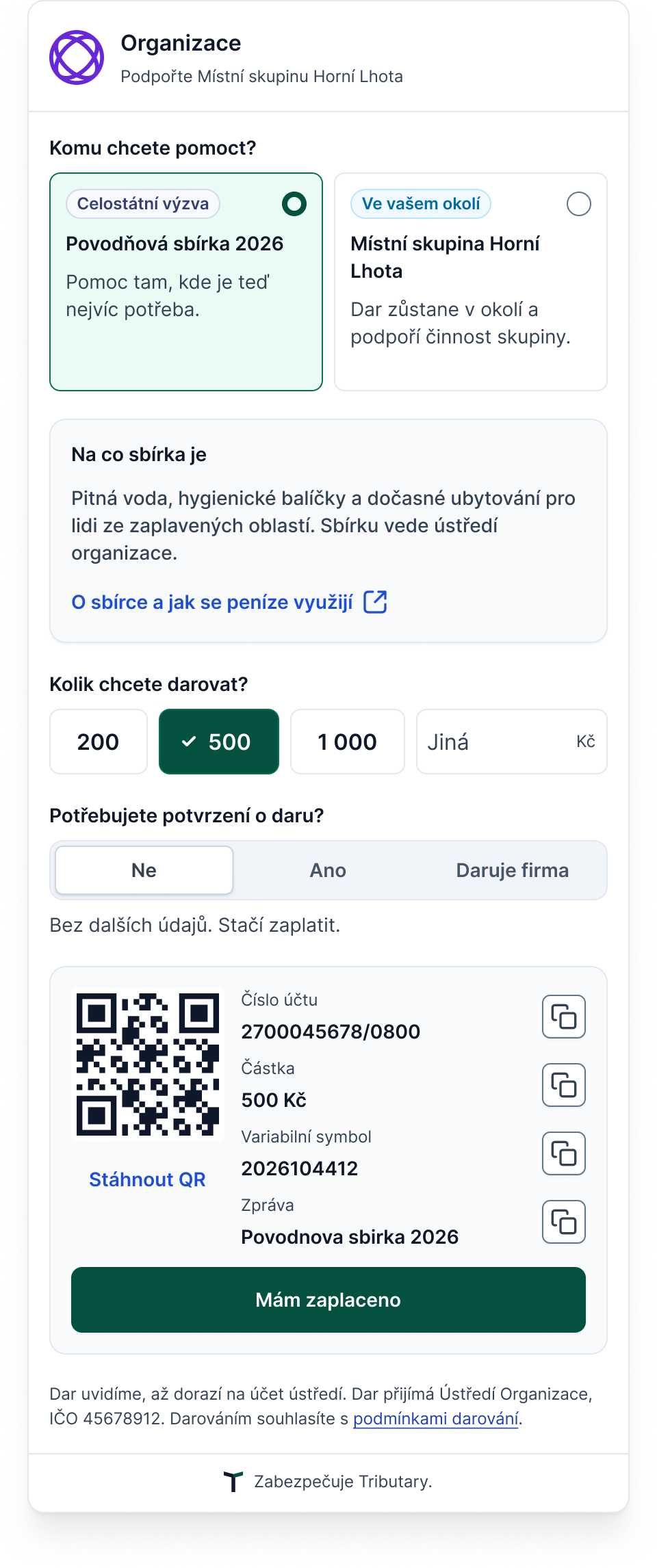
Gift to a national appeal
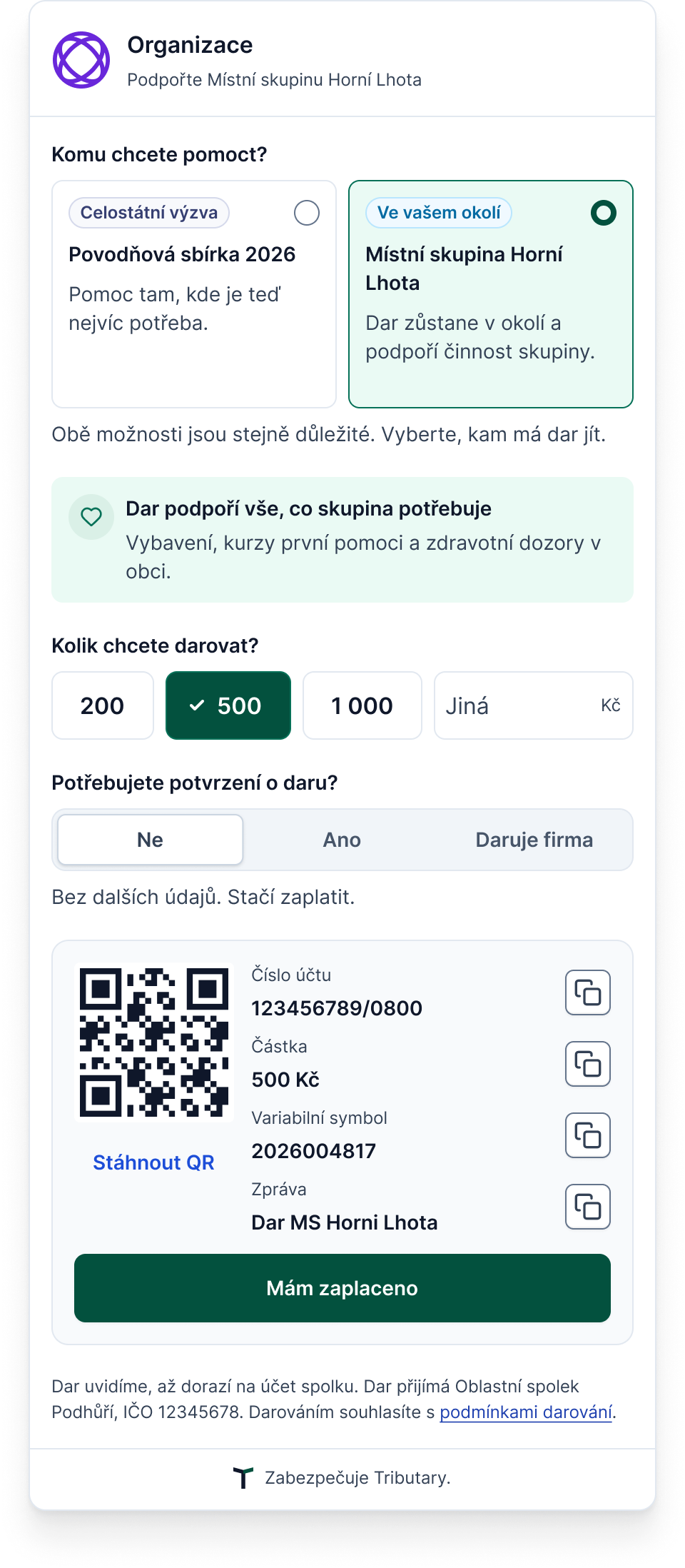
Gift to a local group
2. The platform never holds money
Tension: a payment gateway gives instant confirmation, but holding other people’s money needs a licence, adds fees and makes the platform liable.
Decision: donors pay straight to the branch’s account, by QR code or bank transfer, with a unique payment reference. The branch imports its bank statement and Tributary matches the payments.
Why: no licence, no fees, no money in the middle. The cost is honesty about timing: the donor is thanked when the money actually arrives, not when they click. Card payments are planned for a later version, since 4 of 17 respondents would prefer them.
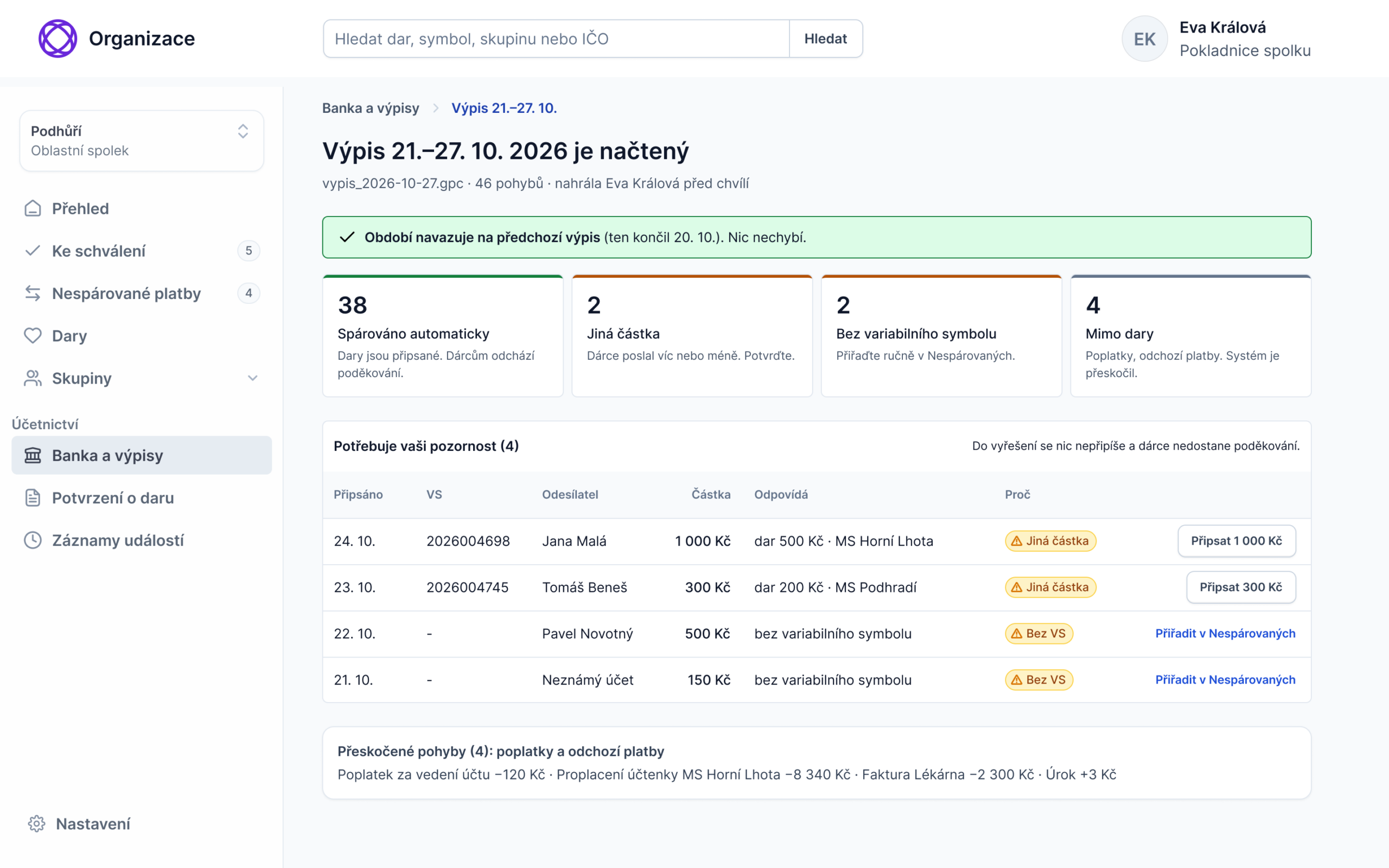
Admin bank statement import
Caption: After the weekly bank statement upload, payments that match a gift are booked automatically. Only the ones that don’t match need the treasurer.
3. Companies are checked before they pay
Tension: an automatic blocklist is fast but blunt. Accepting everything risks a gift that breaks the organisation’s ethics rules.
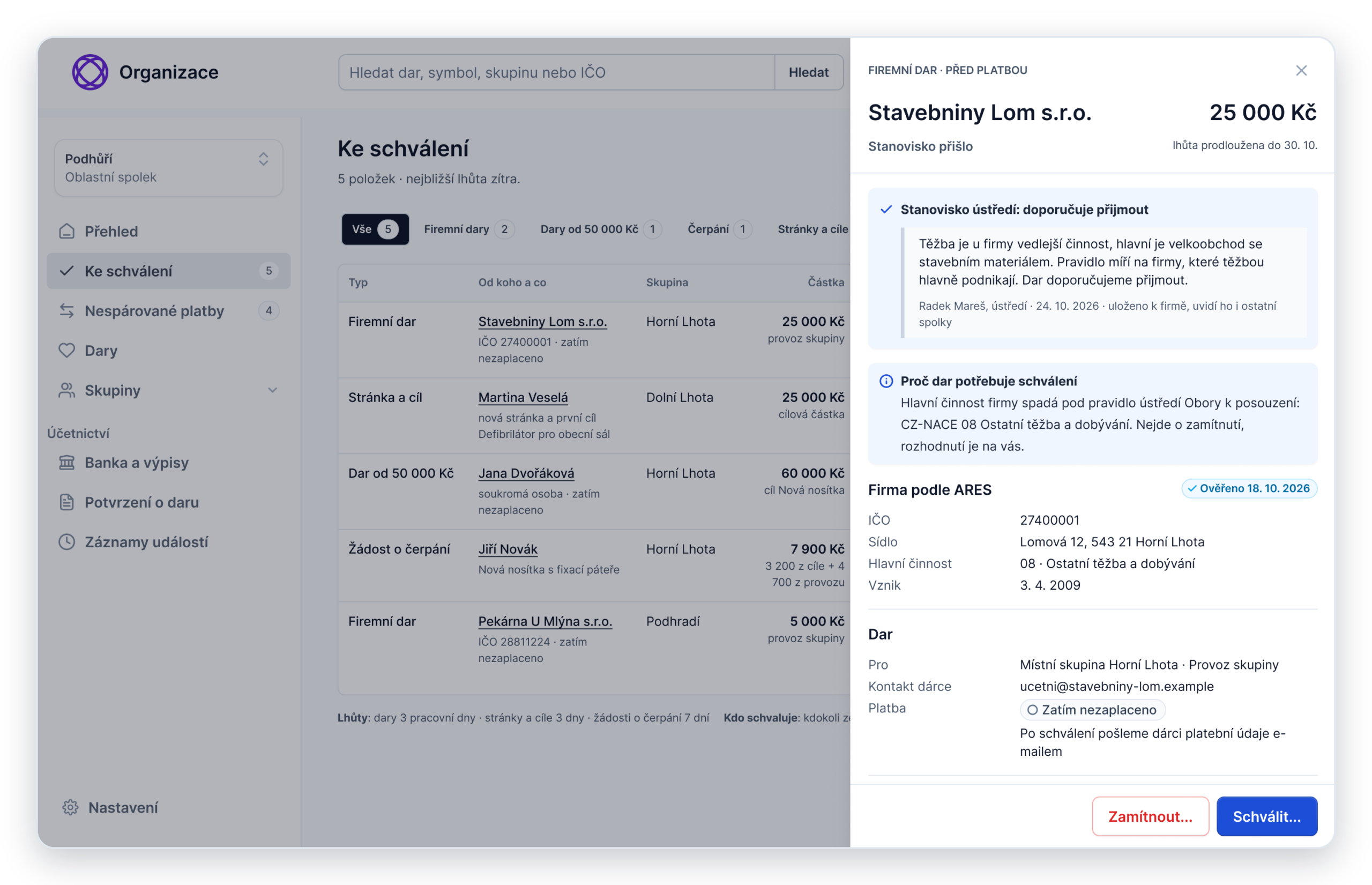
Decision: the widget looks up the company in ARES. A clean company pays straight away. A sector the organisation excludes gets a polite explanation. A sector that needs judgement goes to the branch, and the company pays only after approval. If the treasurer isn’t sure, she can ask headquarters for an opinion. Headquarters advises, the branch still decides.
Why: a company that passes the check pays without waiting. Only the unclear cases go to a person who can judge the context, and no money ever has to be returned.
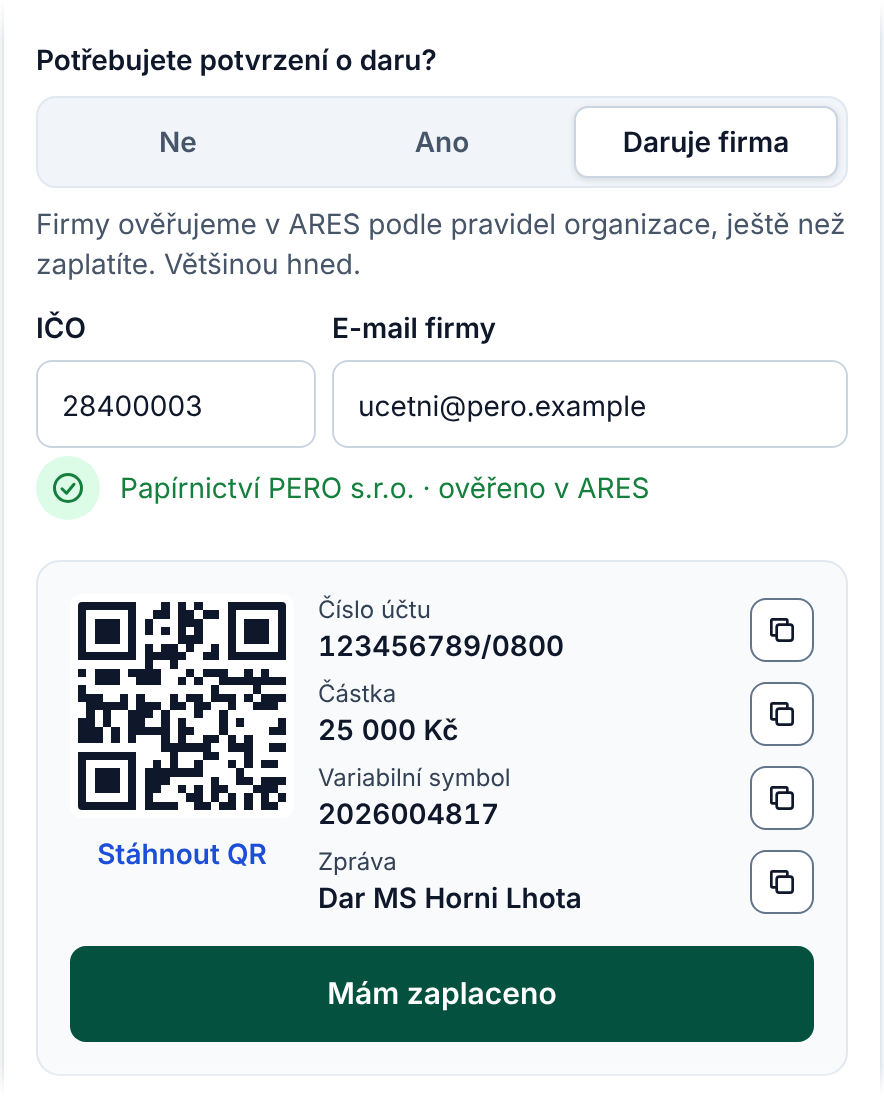
Company passes the check and pays immediately.
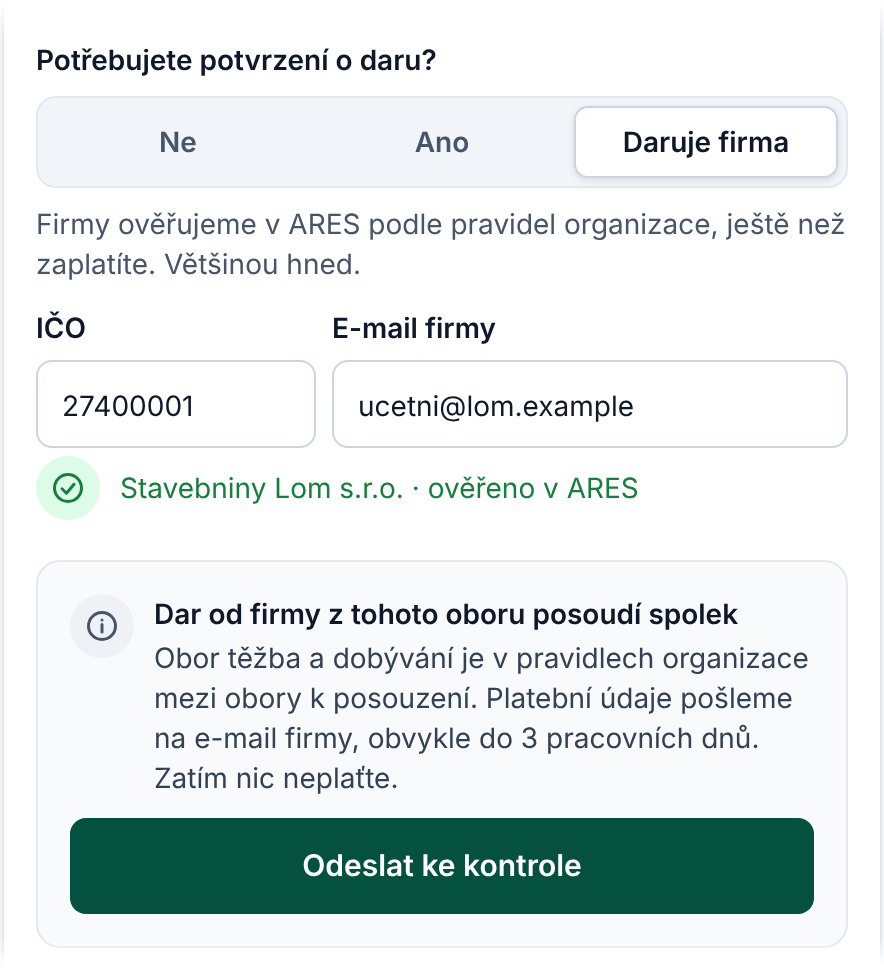
The branch decides before any money moves.
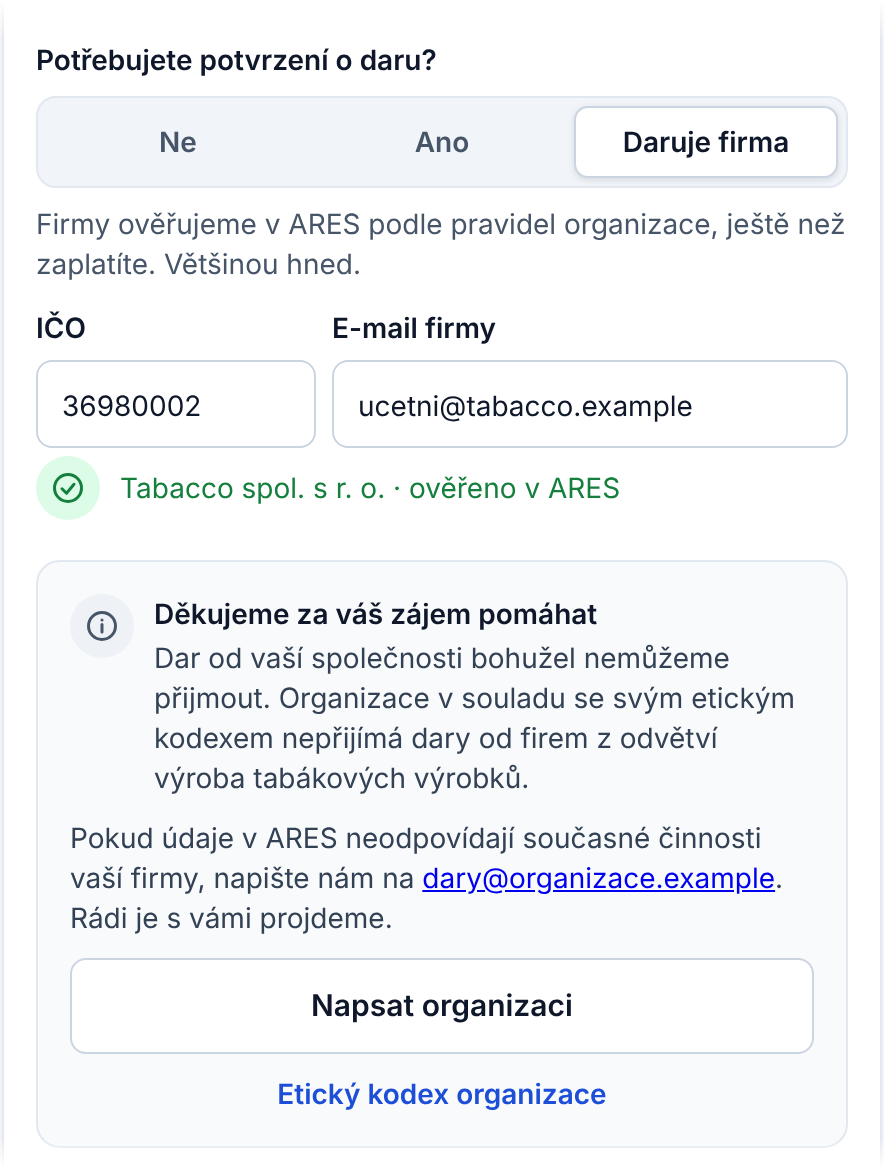
Excluded sector; nothing is paid, nothing returned.
Caption: The donor enters a company ID. Three outcomes: the company pays straight away, the gift is politely declined, or it goes to the branch for review and nothing is paid yet.
4. A goal always has a fallback
Tension: donors want their money to buy one concrete thing. Groups often don’t reach the full amount.
Decision: before paying, the donor is told that if the goal isn’t reached, the gift goes to the group’s general fund. When a goal ends unmet, the leader can extend it once or close it, and donors get a short update.
Why: it keeps the specific story that motivates donors, without money getting stuck. The rule is stated up front, so nothing feels like a surprise later.
5. One surface instead of steps
Tension: a step-by-step form feels guided but adds clicks. One long form feels overwhelming, especially on a phone.
Decision: one surface that reveals the next question only after the previous one is answered. Nothing is preselected, so no answer is made for the donor. Errors appear only where the donor types.
Why: the donor never sees the full length at once, and there is nothing to go back to. It also removed most error states by design.
Questions appear one by one
Transcript:
- The donor chooses who to help. A national appeal and a nearby group are equal options.
- The group’s goal shows how much has been raised and by when.
- Payment details stay hidden until the donor picks an amount. Nothing is preselected.
- Once an amount is picked, the payment details appear: a QR code or details to copy. No sign-up.
- The progress bar shows what this gift adds. It counts once the money arrives.
- The thank-you is honest: the gift shows once it reaches the branch’s account.
04/ One Gift, Three Roles
One gift passes through three people who never meet. Each sees only what they need to act on.
The donor
The donor chooses between a national appeal and the group nearby, picks a goal or the general fund, and sees payment details straight away, with no account and no sign-up. They are thanked when the money arrives, with the name of the group it helped. Screens as above.
The group leader
Leaders are volunteers, so their admin is built for a phone. They edit the group’s page and goals, print a poster with a QR code that leads straight to the widget, ask the branch for money to buy things, and upload a photo of the receipt afterwards. When the branch returns something, the note sits right next to the field it is about.
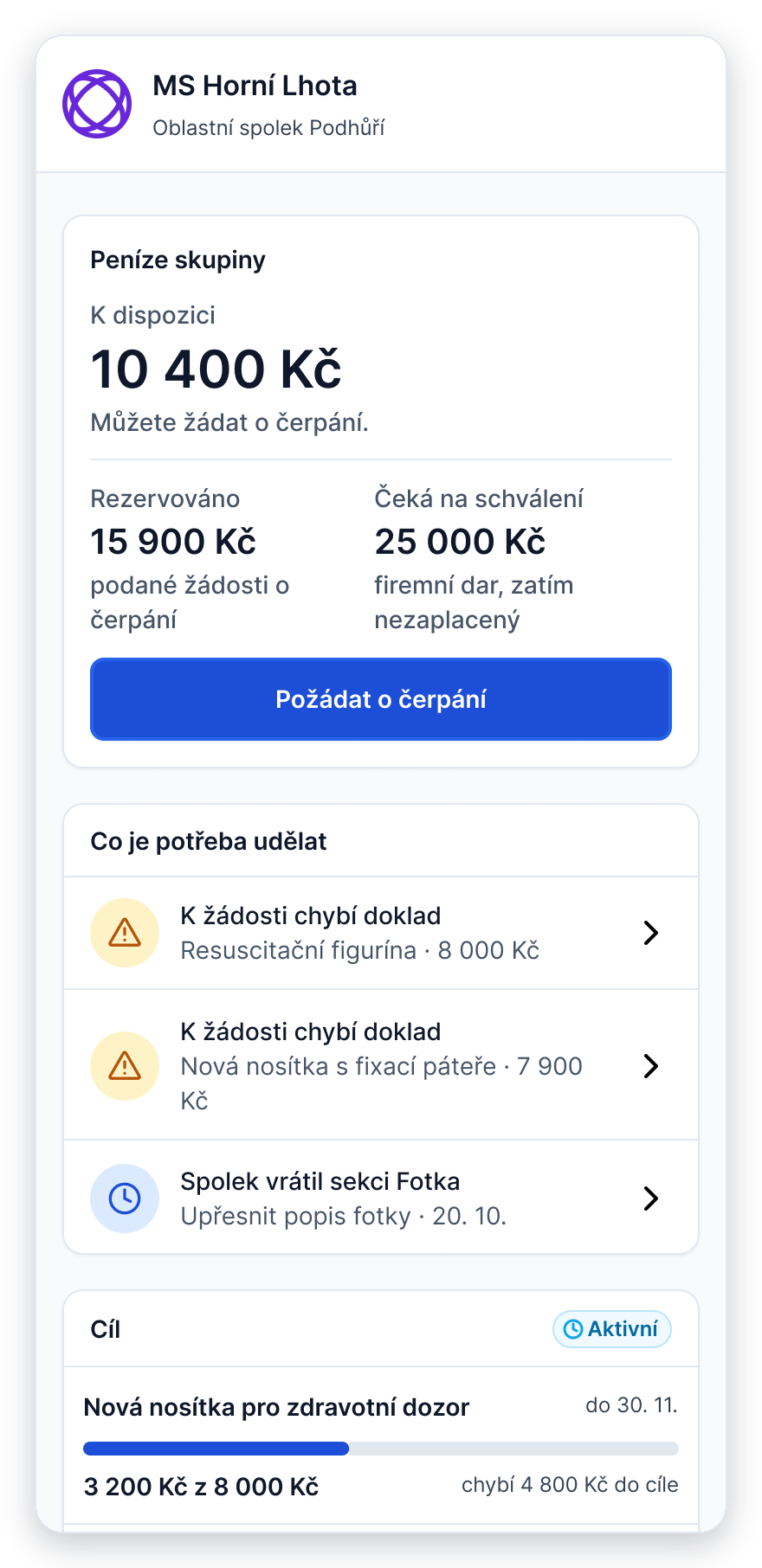
Group overview
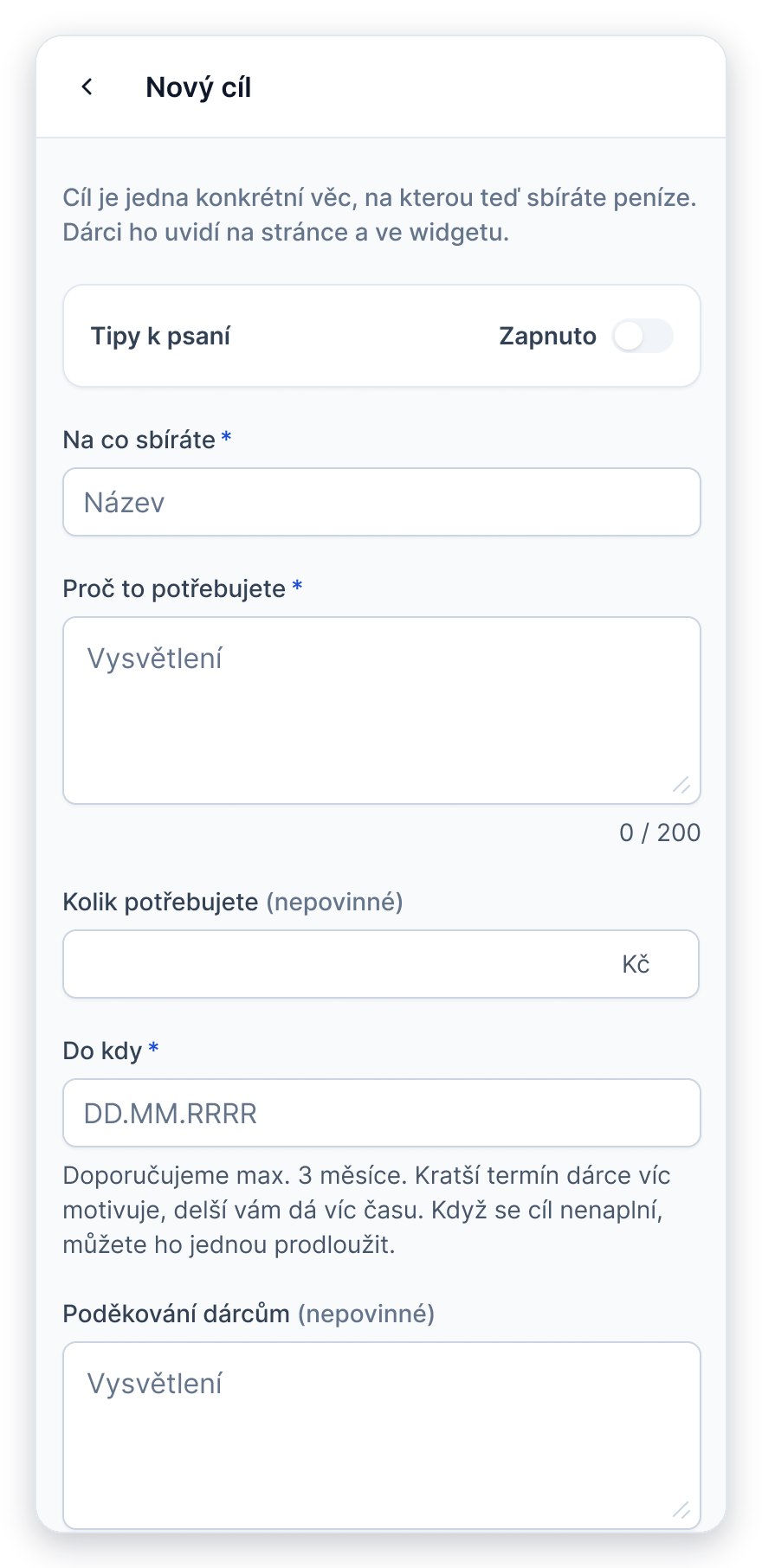
New goal
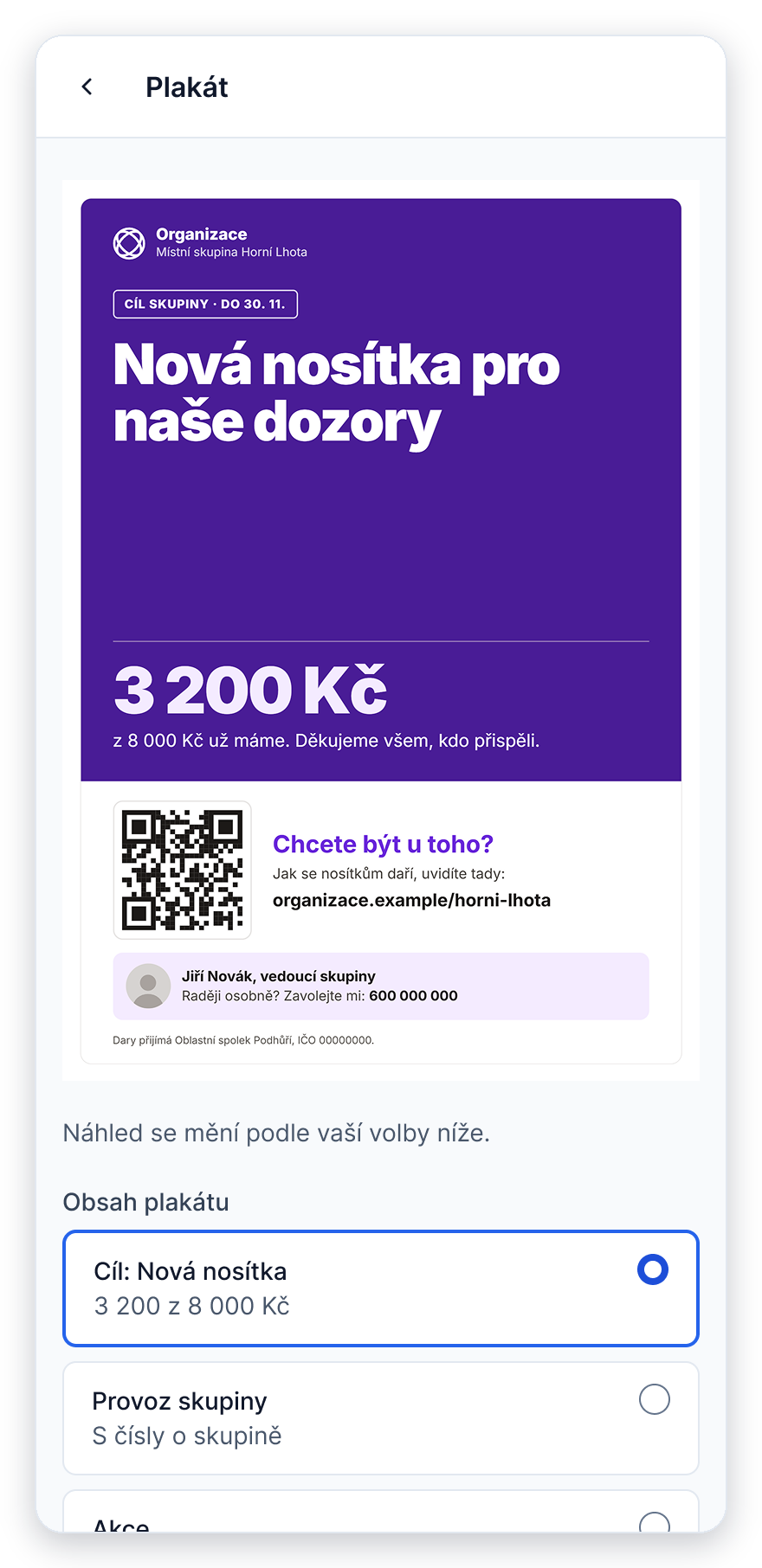
Poster with a QR code
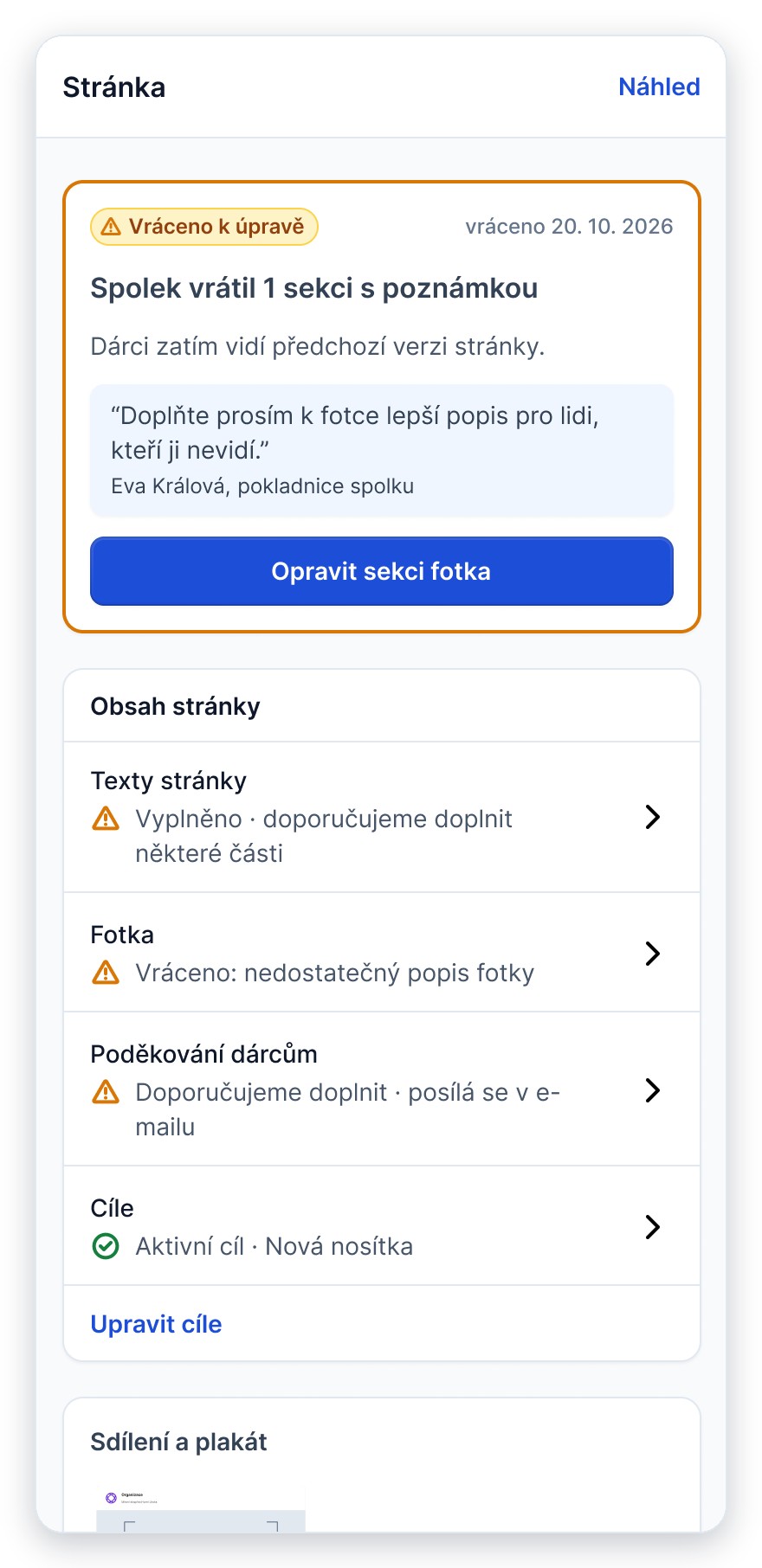
Section sent back
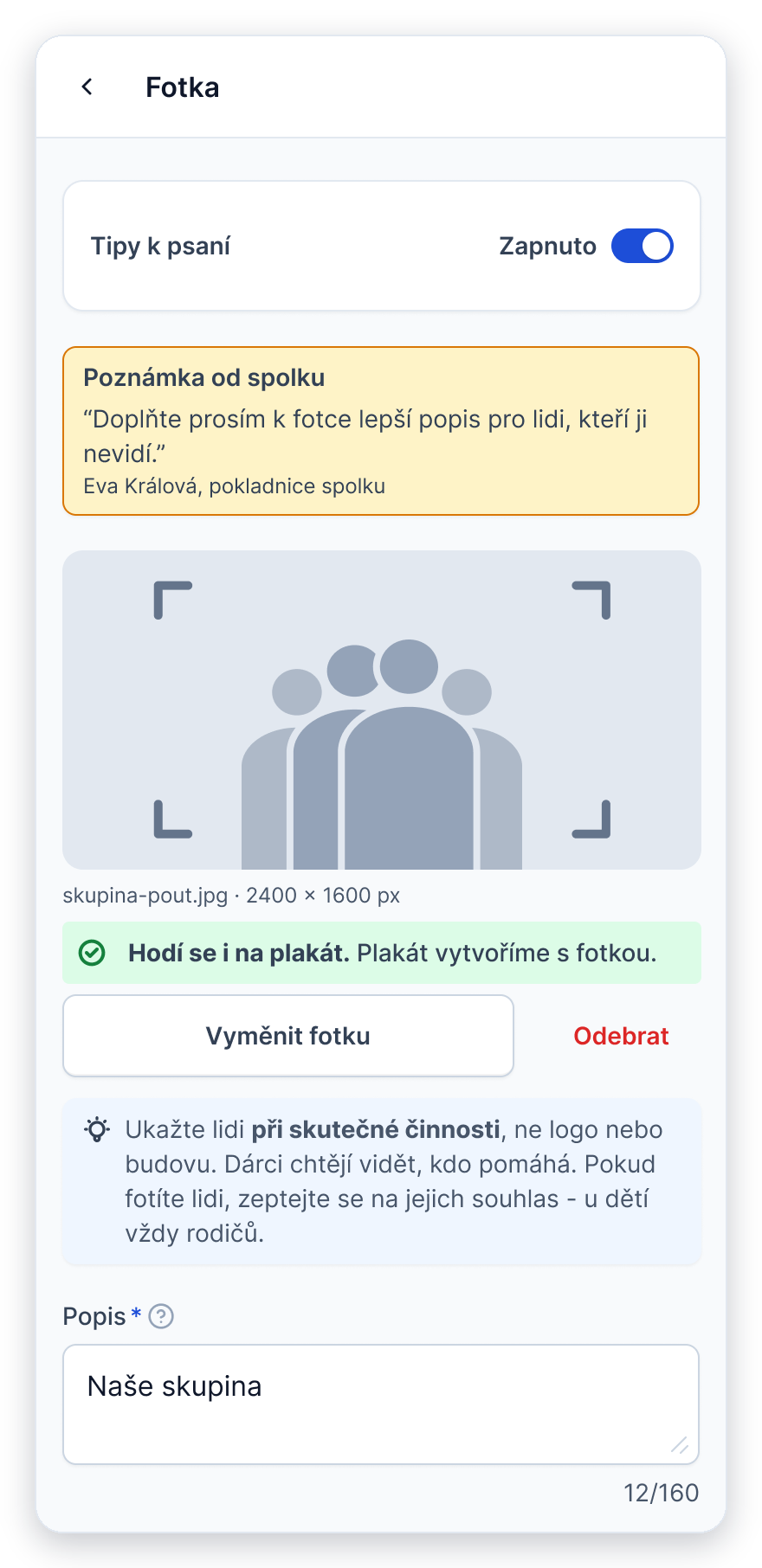
Note next to the field
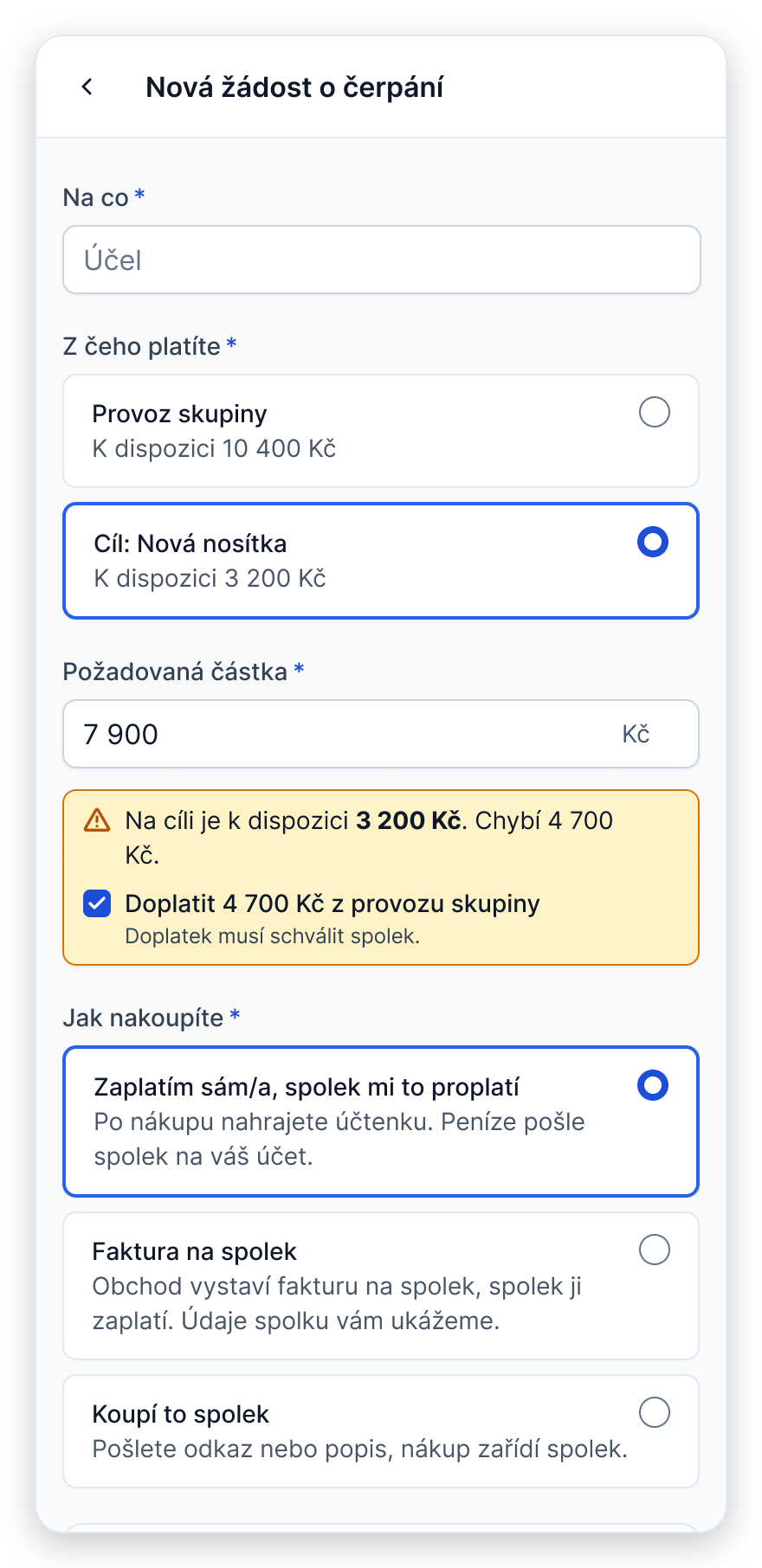
Spending request
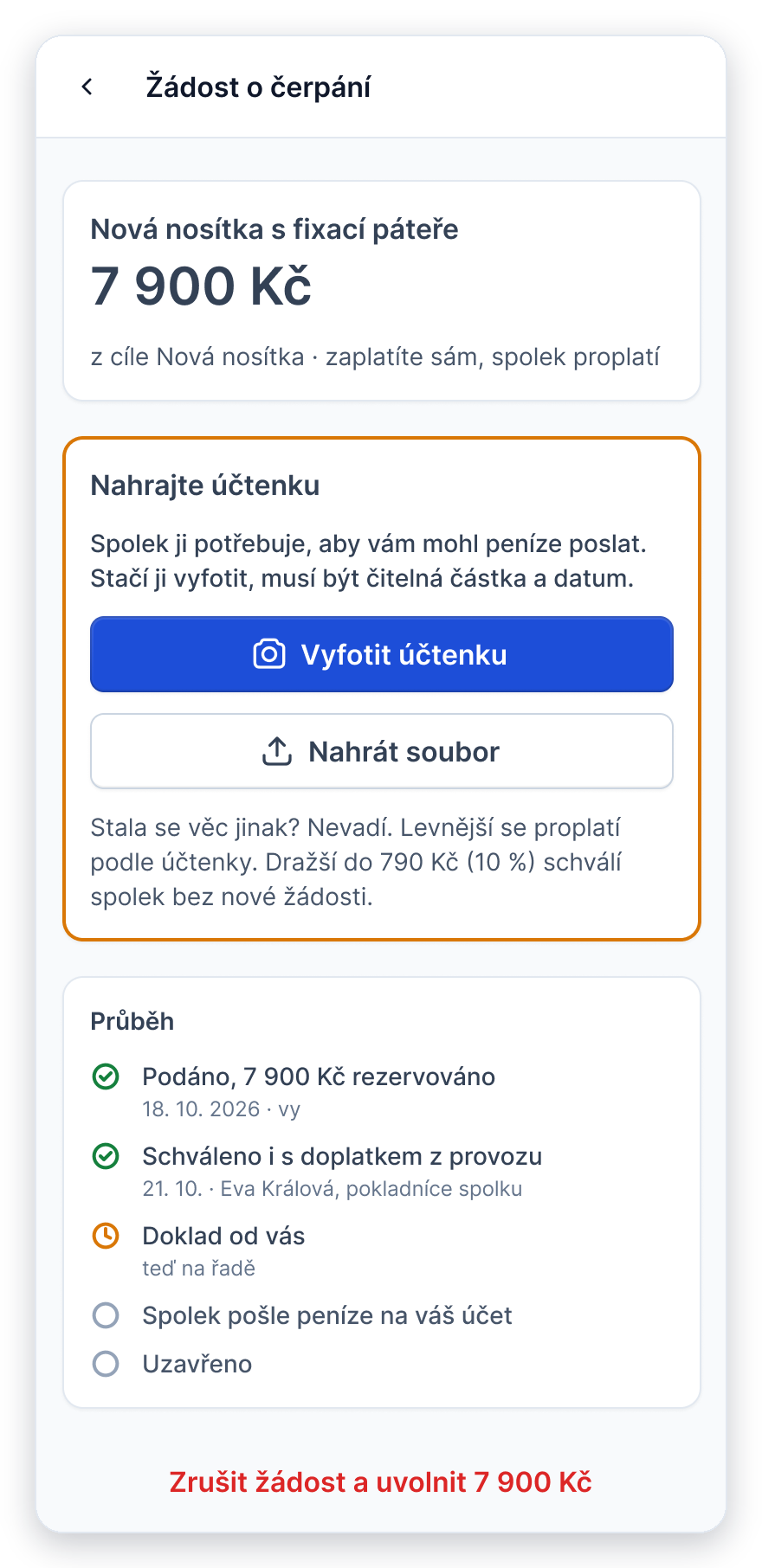
Upload the receipt
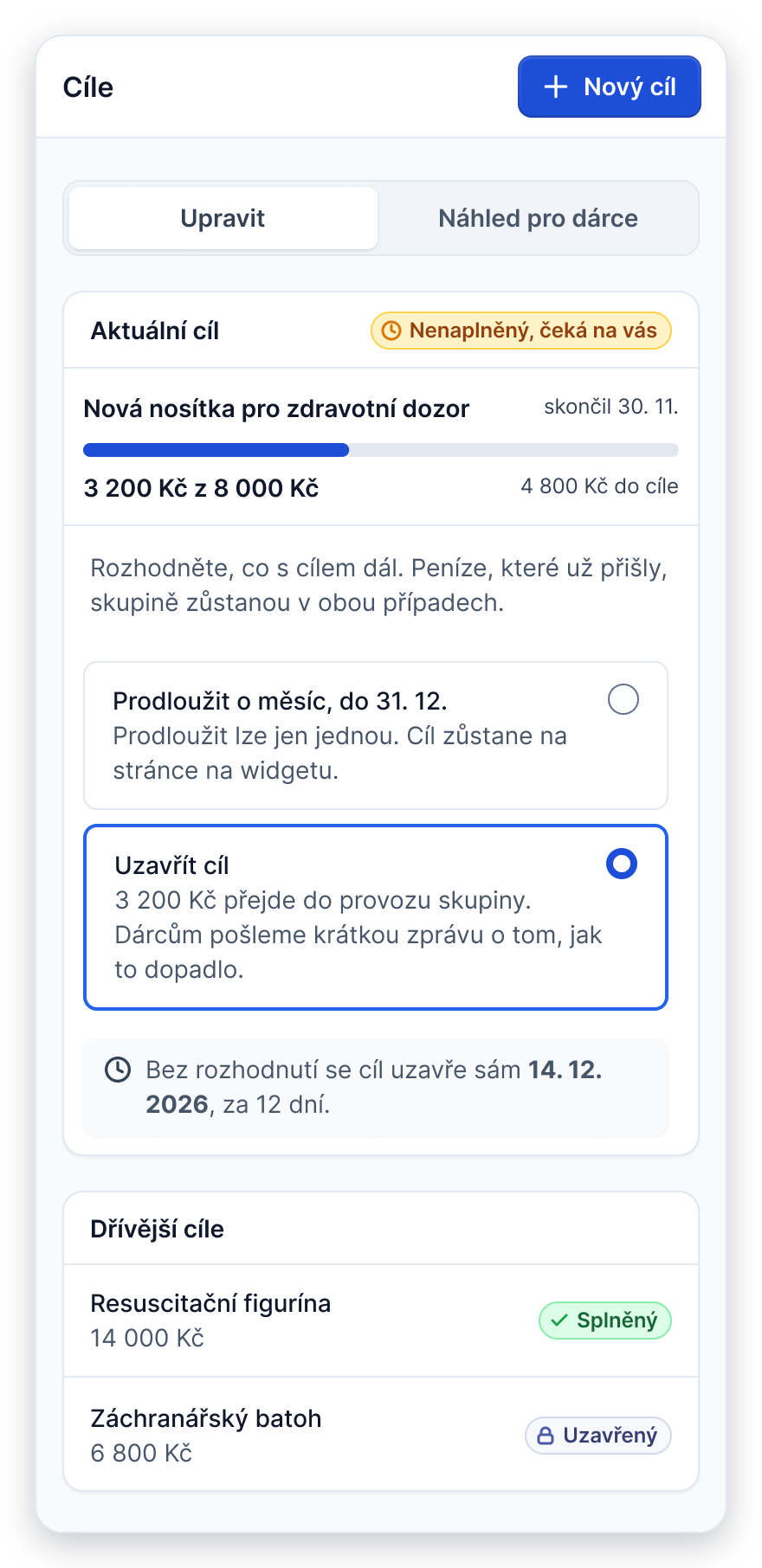
Goal not reached
Caption: The leader’s admin on a phone: from setting up a goal and the group’s page to asking for money, uploading a receipt and closing a goal.
The branch treasurer
The treasurer works through one queue. Every item says why it is waiting and by when it needs an answer. Before approving a company gift, she sees the exact e-mail the donor will receive. Bank statements are imported once a week, and only the payments that don’t match need her attention.
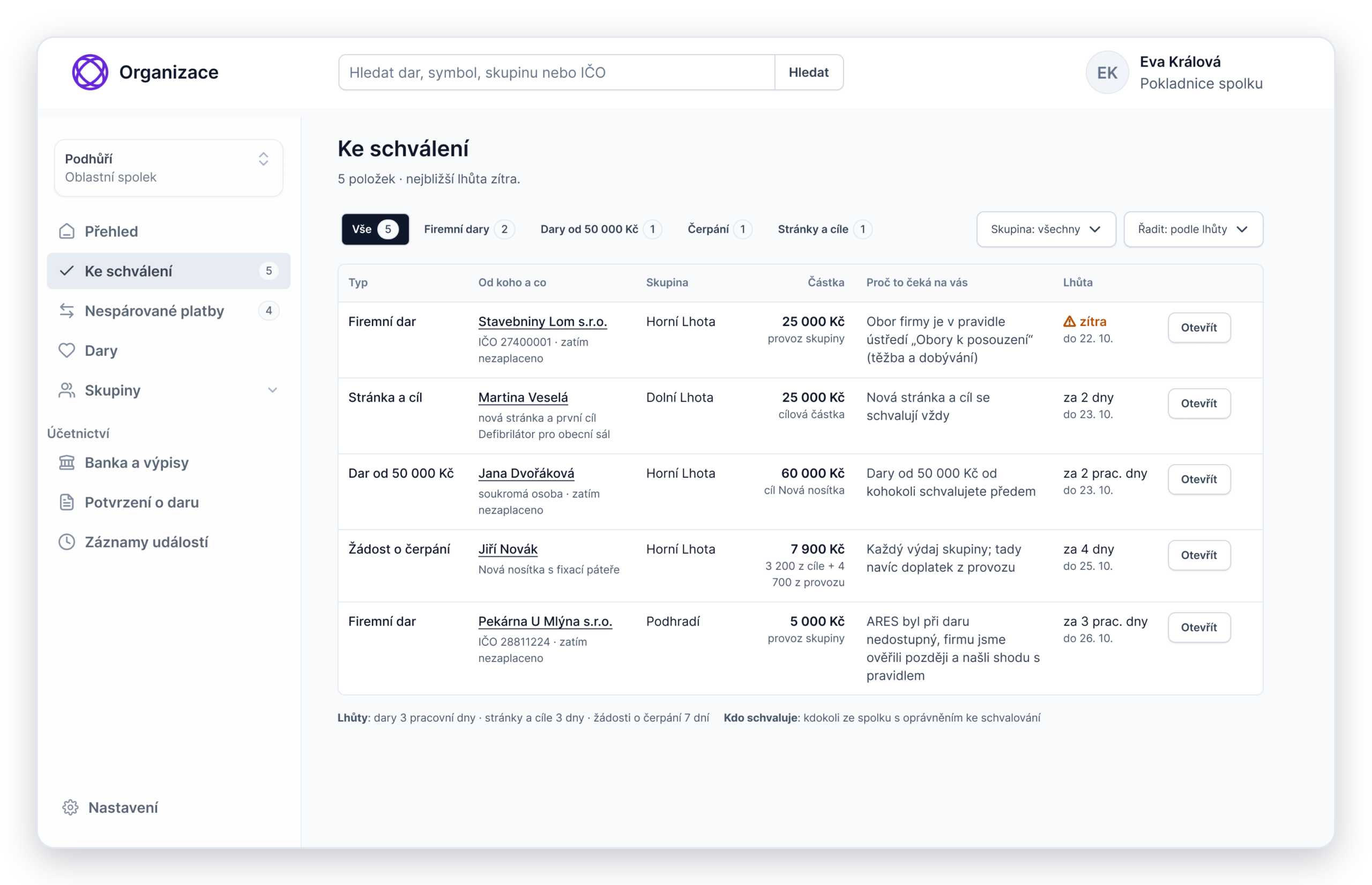
One queue, with reasons and deadlines
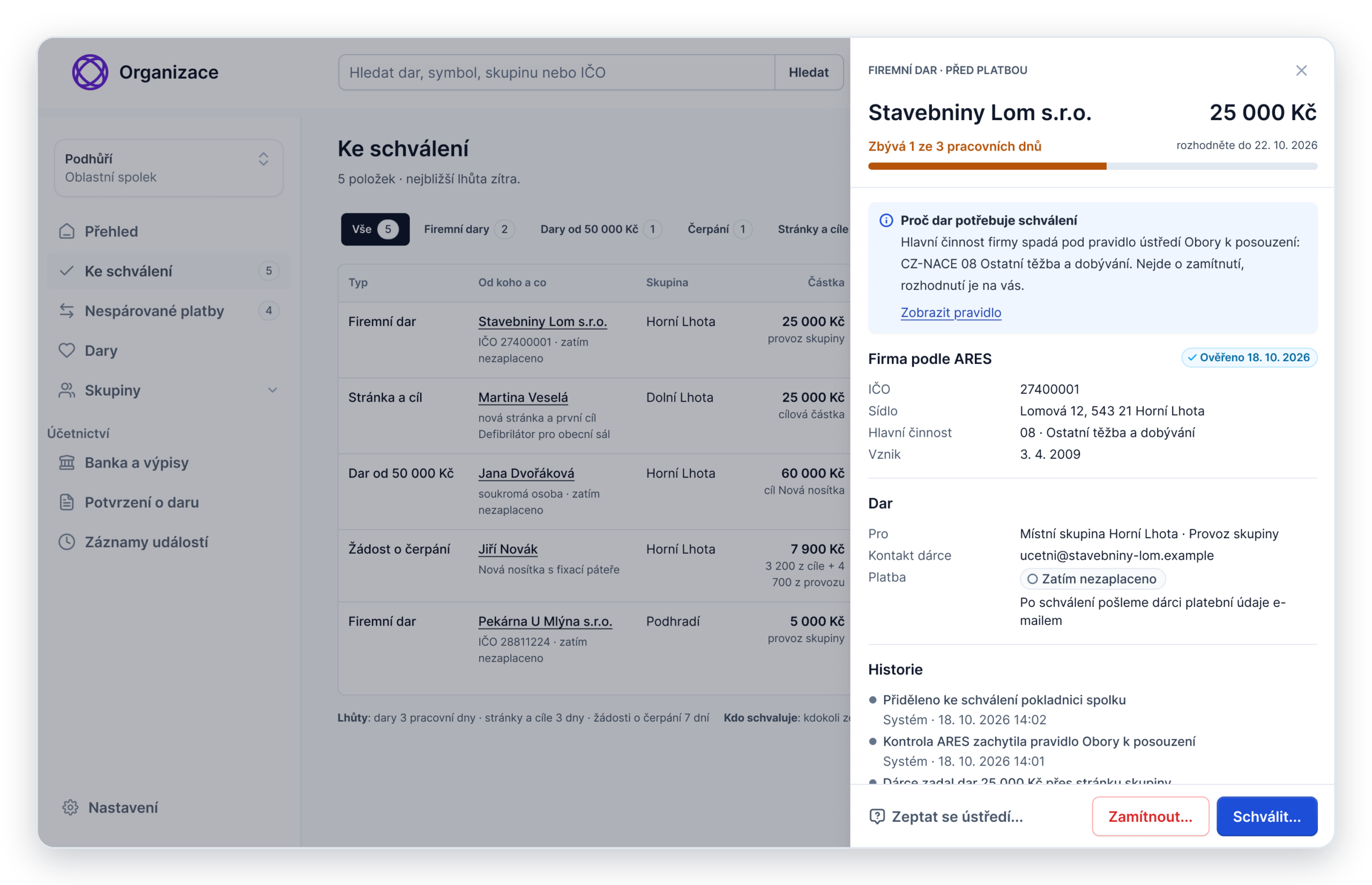
The company’s record
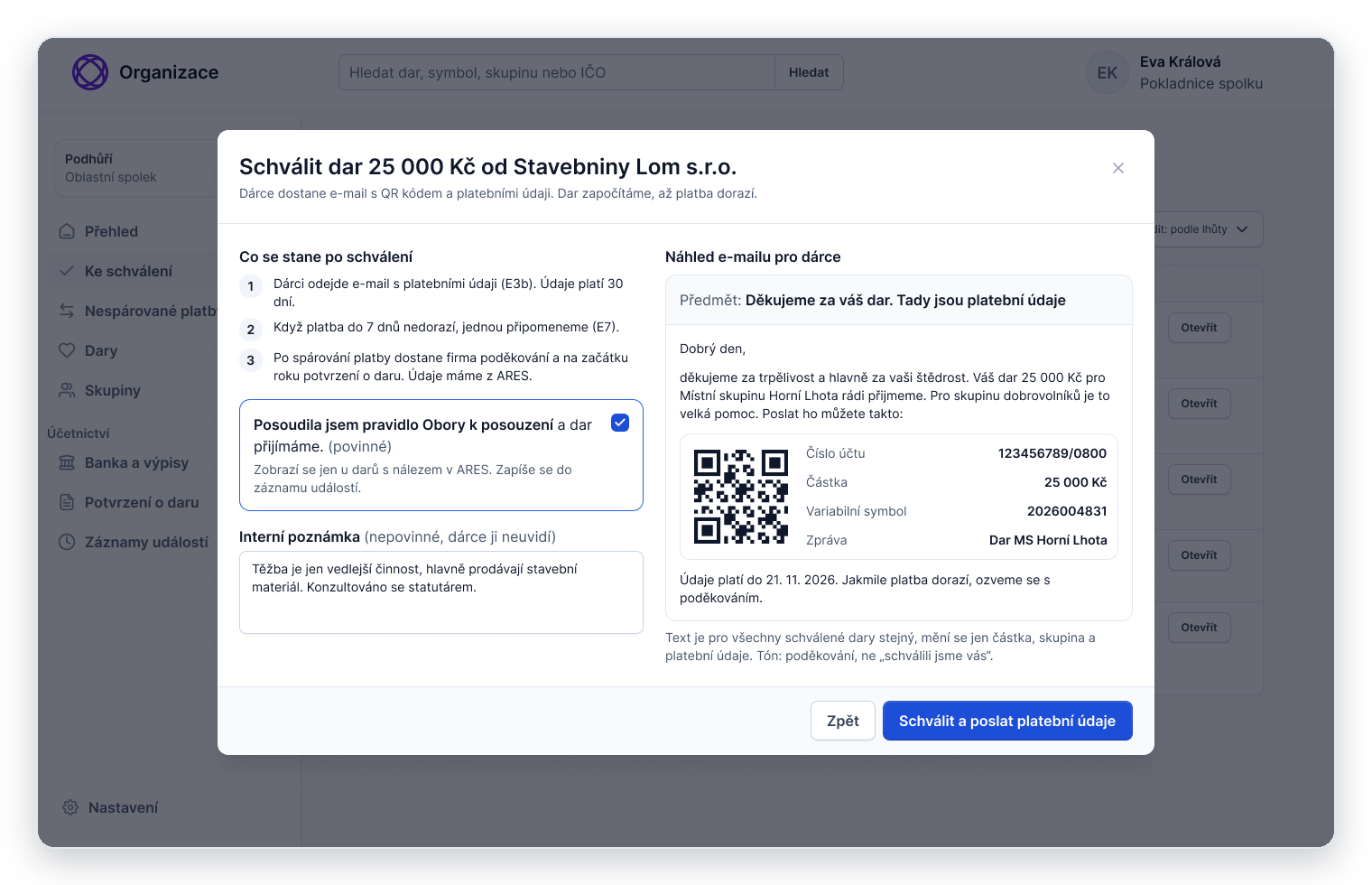
Approving a company gift
Caption: From the queue to approval: each item says why it waits and by when, the detail shows the company’s record from the business register, and before approving, the treasurer sees the exact e-mail the donor will get.
When the branch treasurer isn’t sure
Some company gifts need judgement that the rules can’t give, for example when a company’s registered sector doesn’t match what it actually does. The treasurer can ask headquarters for an opinion. The donor automatically gets an e-mail that the review will take longer, with a new date and nothing to pay yet.
Headquarters recommends accepting or declining, with a short reason, and can save the opinion to the company. Other branches then see it when the same company gives to them. The decision always stays with the branch that received the gift.
An opinion is not final. Anyone at headquarters with the right permissions can revise it, for example when the company’s business changes, and a branch can ask again even if an opinion already exists. A saved opinion never approves a gift on its own: the treasurer always makes the final call.
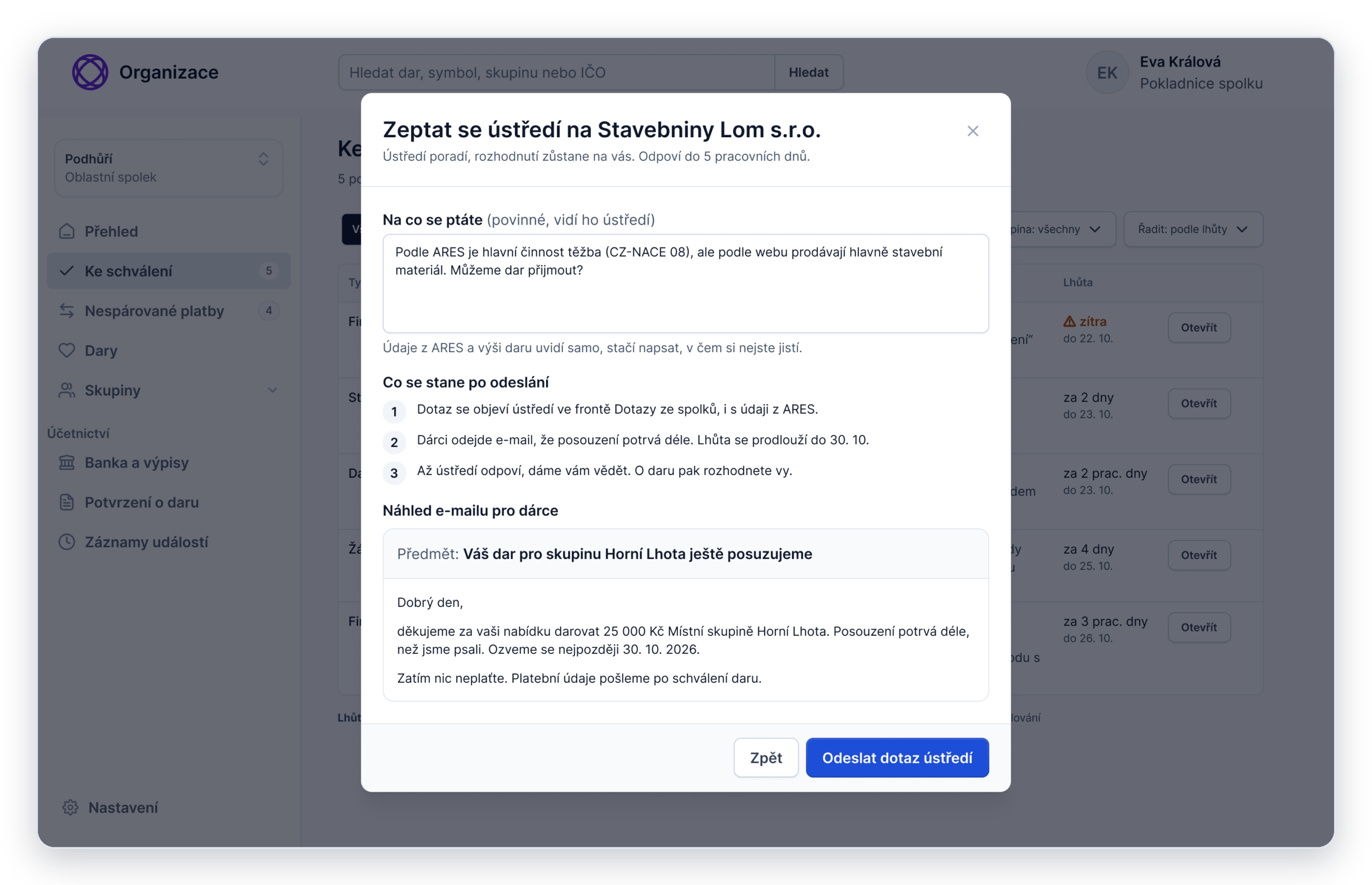
Asking headquarters
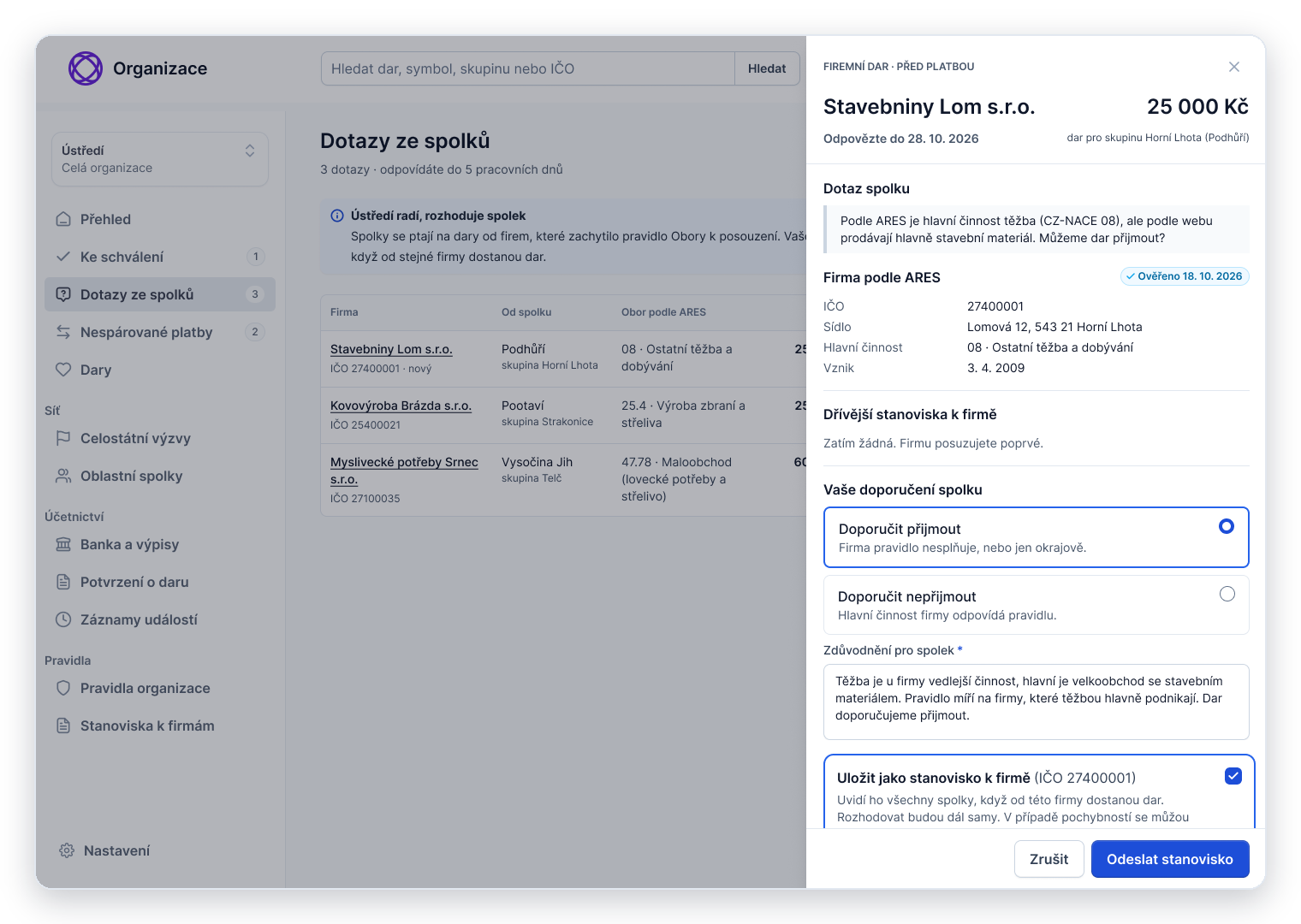
Headquarters recommends
The branch decides
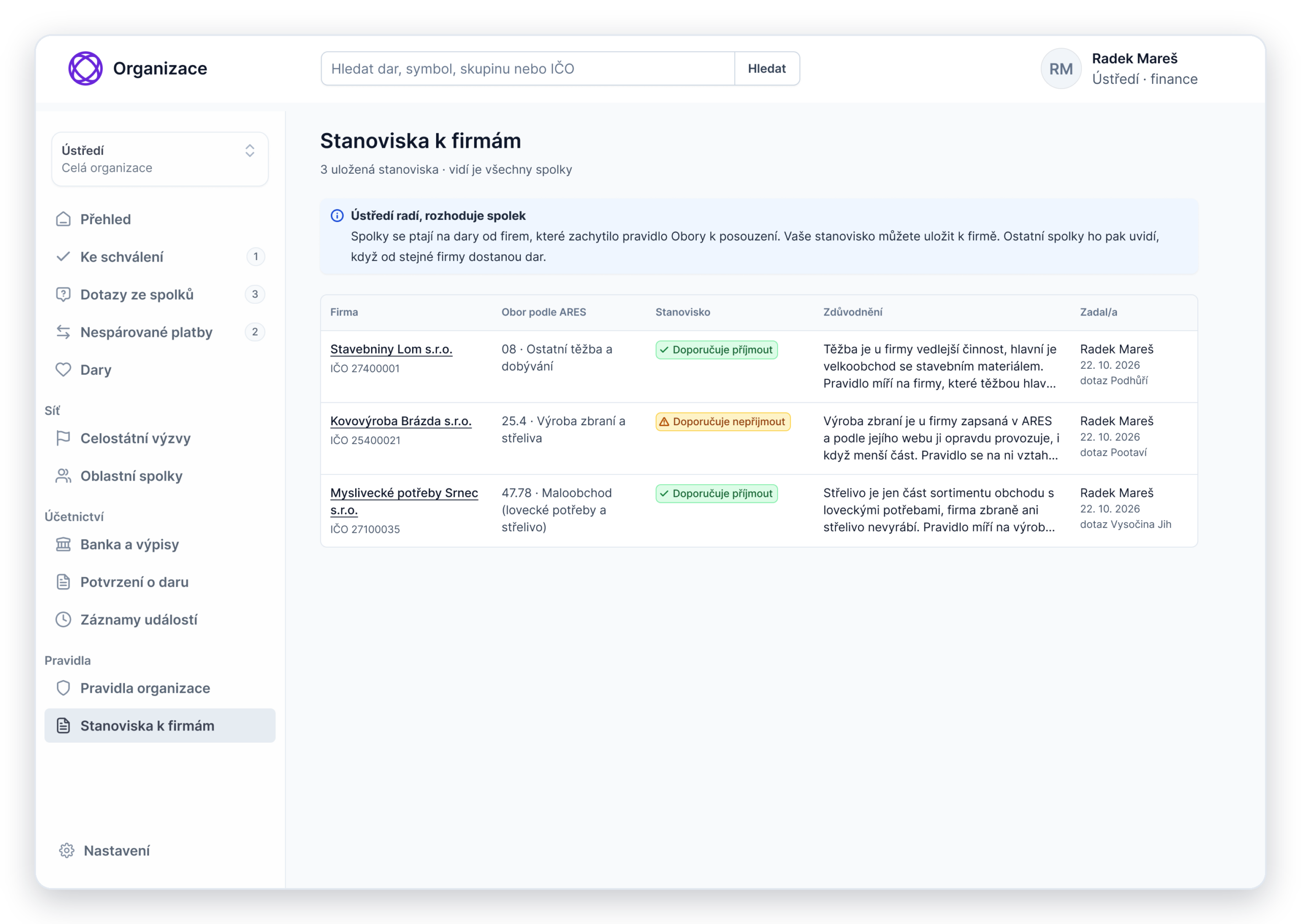
Saved opinions
The treasurer asks headquarters and sees the e-mail that tells the donor about the delay. Headquarters recommends and saves its opinion to the company. The opinion arrives, but the branch still decides, and other branches see it next time.
05/ Designing for the Phone
Getting to the widget
On a phone, the group’s story comes first and the widget sits far below it. I explored seven ways to bring the donor to it, from a floating bar to a bottom sheet. I chose the quietest one: a Donate button in the sticky page header, and calls to action placed where the reader has just been persuaded, under the goal and under “What we use donations for”.
Nothing floats over the story, and the header button disappears once the widget is on screen. A tap scrolls to the widget and moves the keyboard focus there too.
On a phone, the payment sits further down, below the receipt question. So only after the donor has picked a goal and an amount does a small bar appear at the bottom, with their choice and a shortcut to the payment. It disappears as soon as the payment details are on screen, a tap moves the focus to them, and the bar never covers the field the donor is using.
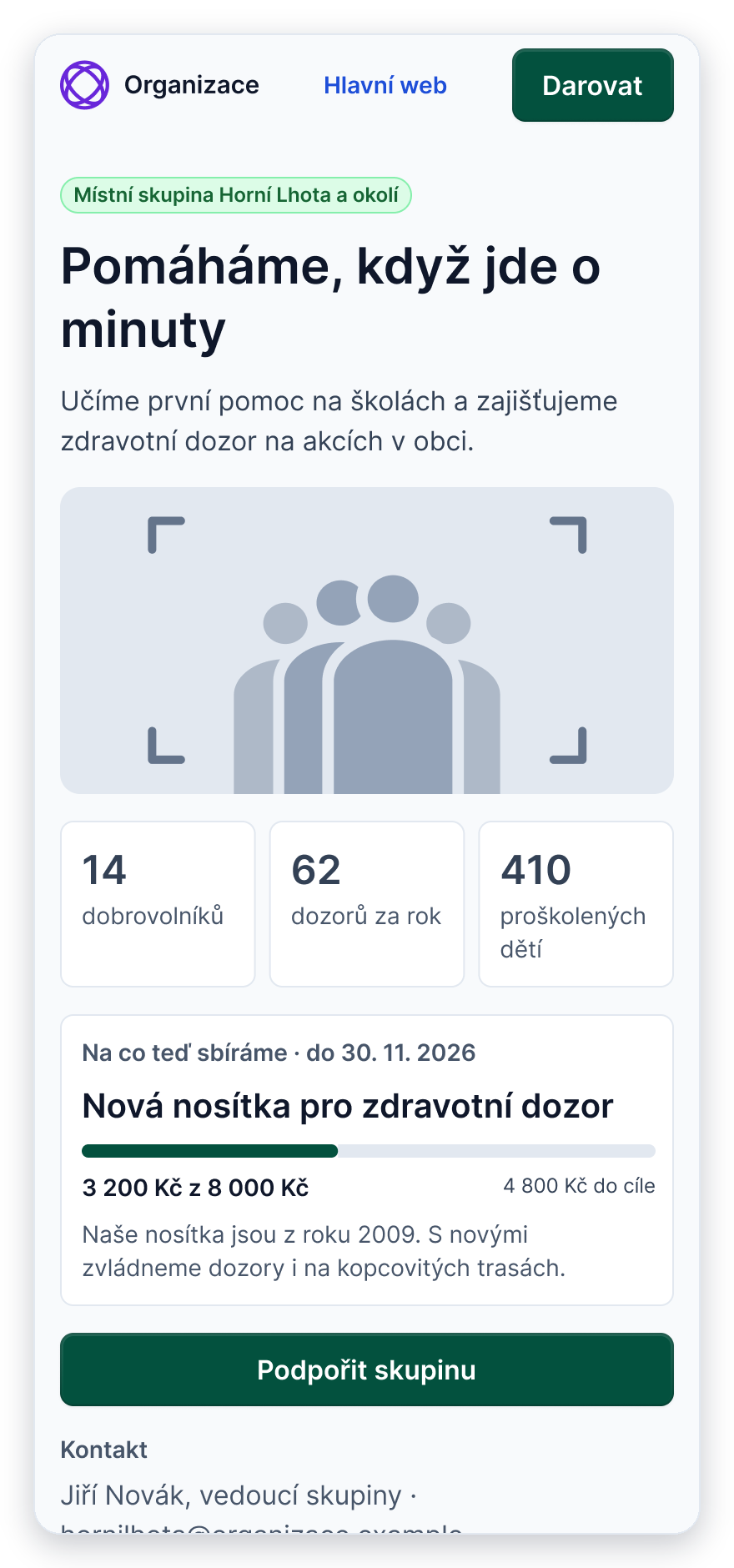
Donate button in the header
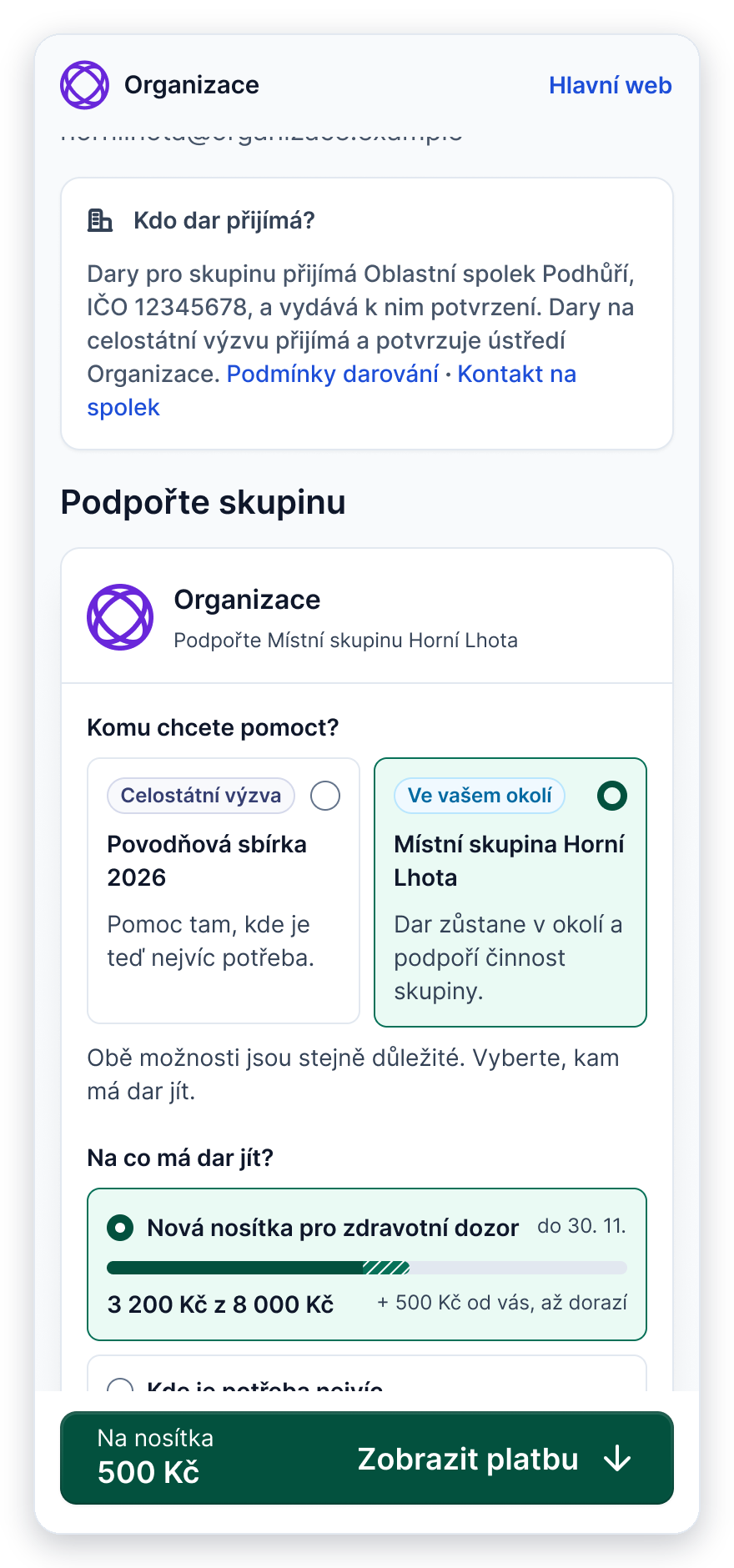
Shortcut to the payment
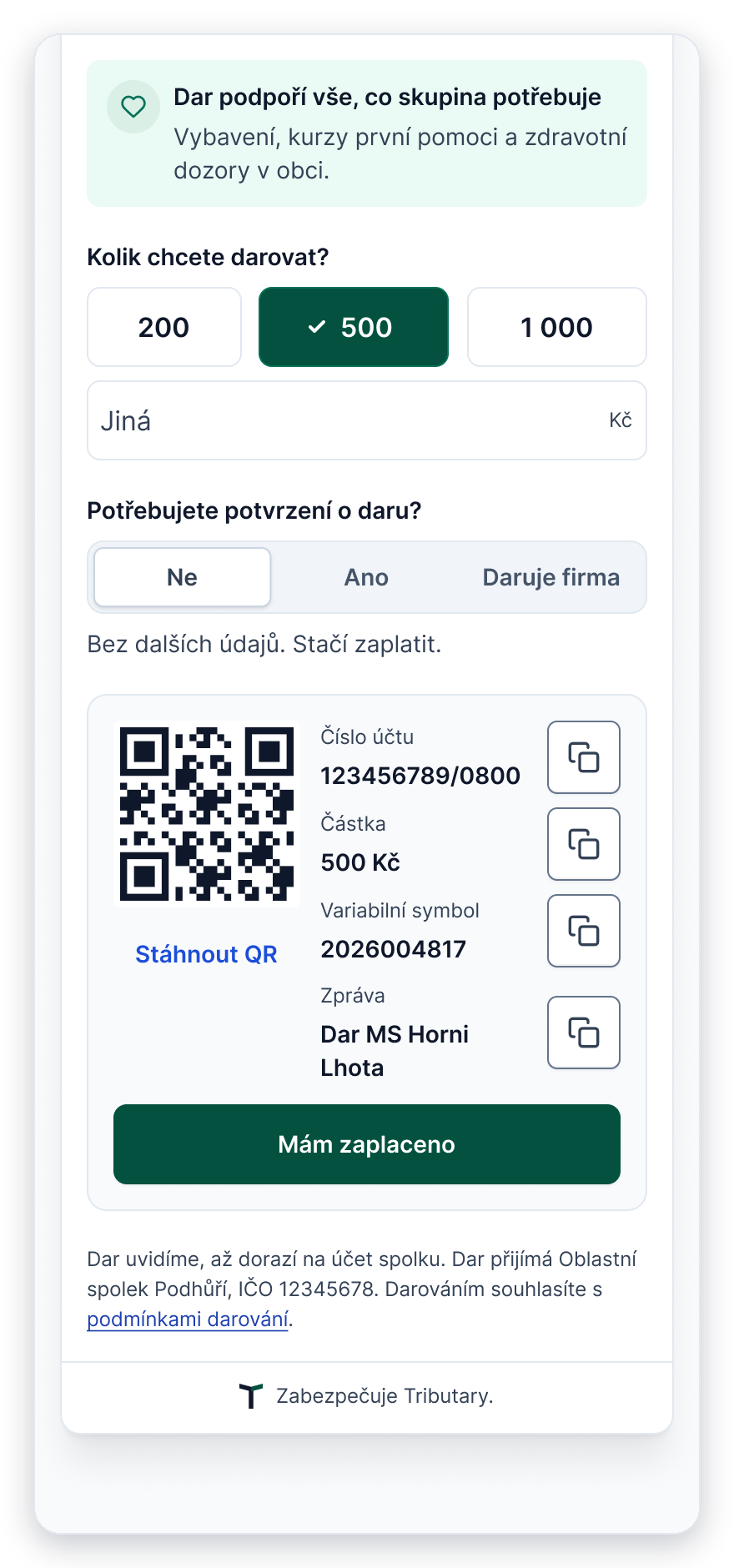
Payment card on a phone
Caption: From the group’s page to the payment: the Donate button in the sticky header leads to the widget, a bar with the donor’s choice leads to the payment, and the payment card is the same as on desktop.
Paying by QR code on the same phone
QR payment was the donors’ first choice. On a phone, though, the code sits on the same screen the donor would scan it with. There are simple ways round it, so the payment card stays the same on every screen size:
- “Download QR” saves the code, and most banking apps can read a code from a saved image or a screenshot.
- Each payment detail has its own Copy button, and the amount copies as a plain number, ready for the banking app.
Switching to a banking app can make the phone’s browser reload the page. The widget remembers the unfinished gift, so the donor comes back to where they left off.
06/ If It Were Built
Tributary is a concept, but I designed it to be buildable. If an organisation wanted to try it, I wouldn’t start with the full system.
Where it fits
Tributary is built for a pattern, not for one organisation: the legal entity sits one level above the people who run the activities and know the donors.
| Fit | Organisations | Why |
|---|---|---|
| Strong | Federated nonprofits whose local groups have no legal identity, such as the model case in this study or scout troops under a scout centre | Donors know the local unit personally, and the unit can’t receive money itself |
| Weak | Small units that already have legal identity, such as a single volunteer fire brigade | They can receive gifts directly, so existing tools for records and receipts are enough |
MVP: one branch, a few groups
The MVP tests the core idea: groups get donations when people are asked in the right place, and the branch keeps track of them without extra work.
| In the MVP | Later |
|---|---|
| Group page with a goal, and the donation widget | Headquarters, national appeals, escalations and saved opinions |
| QR payment to the branch’s account with a unique payment reference | Company checks in ARES (in the MVP, the branch approves company gifts by hand) |
| Posters with a QR code | Spending requests from group leaders (handled as today) |
| Bank statement import and payment matching | Automatic annual receipts (the MVP exports the data for the accountant) |
| A simple branch view: gifts, unmatched payments, donor details | Card payments and a live bank connection |
The pilot would run with one regional branch and two or three of its groups for about three months. Then group leaders and automatic receipts, and only after that the whole organisation, one phase at a time.
Most of it is standard work: Czech QR payments, bank statement import (each bank’s format is its own piece of work), the public ARES API with the organisation’s sector rules on top, PDF receipts and posters, roles and an audit log across three levels, and a legal and tax review before launch.
How I’d measure it
These metrics would show whether the pilot works, and later whether each phase does.
|
Metric |
Why it matters |
|---|---|
|
Completed gifts on phone vs. desktop |
Shows whether the phone flow works as well as the desktop one |
|
Gifts by channel: poster QR, group page, the branch’s own website |
Shows which way of asking actually brings donors |
|
Share of payments matched automatically |
Shows how much manual work the treasurer still has |
|
Time to approve gifts and spending requests |
Shows whether the branch answers within the time it promised |
07/ What It Changes For The People
Without a tool, a gift to a local group follows from the rules. The donor agrees on a gift with the leader. The leader goes to the branch for a gift agreement or at least a receipt, and passes the payment details back. The donor pays, and the branch records the gift and issues the paperwork. Every step runs through a volunteer, and only the branch ever sees the whole picture.
| Without a tool | With Tributary | |
|---|---|---|
| Donor | Arranges the gift with the leader and waits for payment details | Picks a group and a goal and pays straight away, with no sign-up |
| Group leader | Carries messages and paperwork between donor and branch, and asks for support in person | The group’s page and posters do the asking; the leader never handles the gift |
| Branch treasurer | Matches payments, records gifts and writes receipts by hand | Deals only with exceptions: unmatched payments and approvals |
| Headquarters | Has little say over who gives to the network until the money has arrived | Sets the rules once; companies are checked before they pay, and opinions are shared across branches |
Hypothesis to test in the pilot: about 85 hours a year saved for a branch, and about 100 hours of volunteer time.
Assumptions, not measurements: 300 gifts to groups a year; today about 20 minutes of branch work and 20 minutes of the leader’s time per gift; with Tributary about 3 minutes for the branch and none for the leader.
08/ What I Learned
The legal rules didn’t disappear, they moved. The donor sees one group and one goal; the treasurer sees why each item is waiting. Deciding who carries which part of the complexity was the real design work, and most of it was about timing and order: when a question appears, when a donor is thanked. I worked that out in clickable prototypes, not in static screens. And with a small survey and no research with branches, I marked my assumptions as risks instead of filling the gaps with confident claims. It makes the study less polished, but more useful to anyone who would build it.
I used Claude as a thinking partner early in the project. It helped me map how the rules affect each role and list edge cases, such as unmet goals, unclear company sectors and unmatched payments, before I started designing screens. It was useful for finding gaps in my logic, not for making decisions: those came from the donor survey, the legal rules and testing the prototypes.